
Compatibility and Discontinuation
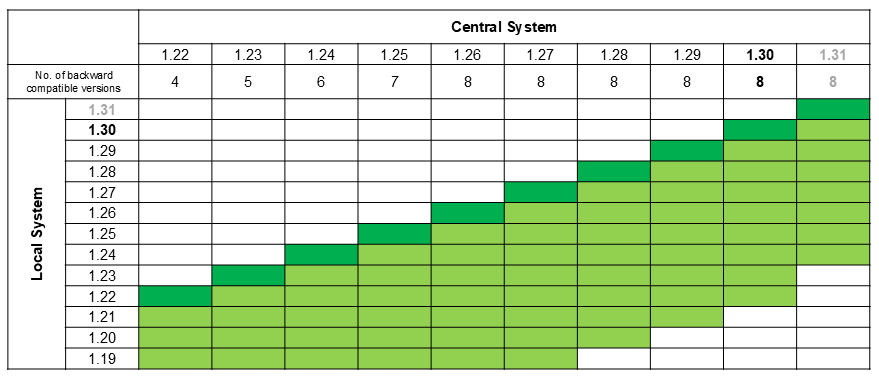
- No longer compatible with local machine systems running CI-Suite V1.21
General Features
- Docker container support (preview) – An alternative to traditional setups for the first core components of the central system:
- STIWA HMI Service
- Shopfloor Monitor
- Andon Board
- AMS Analysis-CI
AMS Analysis-CI Extensions
- New architecture for measurement analytics
- Full integration of HMI components into Analysis-CI
- New data API, on-demand calculation, and HMI visualization
- Improved performance and scalability with large data volumes
- New visualizations
- Visualize Correlations Instantly
- Scatter plots are ideal for examining the distribution and relationships of individual data points (showing relationships between two measurements). Spot linear trends, cluster formations or outliers the moment they appear and act before small issues become costly problems.
- Turn Dense Matrices into Clear Answers
- Heat maps are best for analyzing dependencies among multiple measurements. Complex correlation matrices are now color‑coded through heatmaps for instant clarity. Detect strong positive or negative relationships and uncover hidden drivers that traditional tables keep buried.
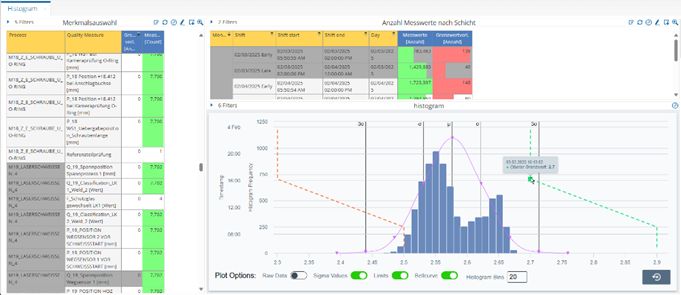
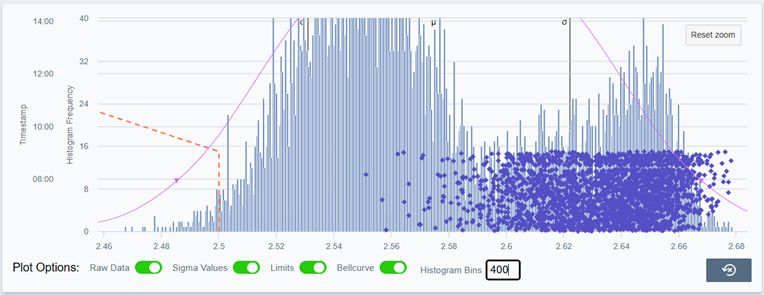
- Improved histogram for detailed distribution analysis (pictures 1 and 2: below)
- Single-cycle-time analysis for process optimization
- Visualize Correlations Instantly
STIWA Shopfloor Control & Monitor Improvements
Improvements to user friendliness through leveraging the potential of the in-house HMI framework are underway. With the latest update, evaluations from AMS Analysis‑CI are now displayed directly on the system terminals in Shopfloor Control and Shopfloor Monitor dashboards, no extra screens, no extra clicks. Operators and managers see live and historical KPIs side‑by‑side, then jump into AMS Analysis‑CI with one tap for deeper exploration.
This combination of views displays both current and historical data in a single overview. Analysts who want to continue research can use the AMS Analysis-CI link to resume work with the preset parameters, right where the last evaluation left off.
- Optimised dashboards
- Performance analysis with shift and order history
- Scrap analysis based on NOK criteria and process errors (picture 3)
- Part analysis across multiple machines
- Easy navigation to detailed views in AMS Analysis-CI (picture 4)


- Offline Rework Station
- Fully functional rework station without PLC program
- Rework actions: rework, scrap, pack, cancel
- Customisable via HMI-Framework Editor
- New Functions and Controls
- ValueRecorderControl for client-side recording of arbitrary values
- Support for type or machine parameter arrays and editors
- KPI descriptions as tooltips for better understanding
- Improved WDS panel with automatic refresh
- Display of feeder and output positions with batch data
- Enhanced alarm lists with quick filters and documentation links
- Support for Microsoft Entra for secure remote access management
- Keycard reader support
AMS ZPoint-CI Improvements
- Siemens S7 optimisations
- TLS-encrypted communication with optimised data blocks
- Human-readable alarm numbers
- Filter options for CPU alarms by ProducerID
- Regular expressions for alarm classification
- Better handling of repeating data (measurements, welding positions)
- Other improvements
- TwinCAT 3 Pack_mode support for 1-byte and 8-byte alignment
- Warning when the number of unprocessed messages in the MQTT broker rises
- Option to specify the nest number in PartialWorkResult
- Additional quality-data events for SetWorkResult and PartialWorkResult
- Retention of the performance graph after a server restart
STIWA Shopfloor Manual Data Input
STIWA Shopfloor Manual Data Input now accepts multiple job entries per shift. Assemble different sub‑assemblies on the same bench as demand changes, without downtime or re‑configurations.
- Multi-order recording per shift
- More detailed and realistic depiction of shop floor activities
- Granular data capture for different orders within a shift
- Better analysis through finer data granularity
- Fully integrated with Analysis-CI
AMS ZPoint-CI Data Distributor (M2M)
- Type-Dependent Machine Targets:
- Reduction of database load and improvement of M2M efficiency
- Type-specific control of which machine targets receive WDS records
- Optional deactivation of data transfer per type
- Improved logging for data transfer status per connection
AMS FIT-CI Improvements
- Support for processes with multiple linked PLC instance types
- Product Data Manager mapping in process actions
- Extended number range support for process and product errors
- Configuration validation for dots in PLC object names
- Warning for disabled Product Data Manager
Ready to Experience the Difference?
Start using the new release today to improve quality, efficiency, and customer satisfaction. Update Now